Skip header section
US Census Bureau
People Business Geography Newsroom Subjects A to Z Search@Census
 

Foreign Trade

Skip top of page navigation
You are here: Census.govBusiness & IndustryForeign Trade › U.S. International Trade Data

U.S. Imports of Petroleum


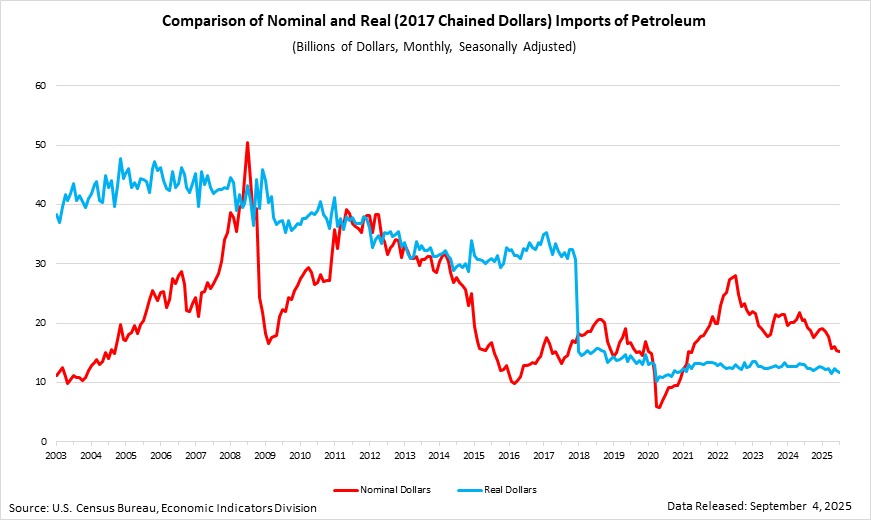
Comparison of nominal and real imports of petroleum

Fusioncharts will load here

This graph compares U.S. imports of petroleum using nominal imports (seasonally adjusted), and real imports (chain-weighted 2005 dollar basis). The vertical axis shows imports in billions of dollars. The horizontal axis shows a monthly time-series, from January 2003 to September 2010. The two series cross in 2005, reflecting the fact that the real dollar series is based on 2005 prices.

The data for this graph come from Exhibit 9: Exports, Imports and Balance of Goods, Petroleum and Non-Petroleum End-Use Category Totals (Seasonally Adjusted), and Exhibit 11: Real Exports, Imports and Balance of Goods, Petroleum and Non-Petroleum End-Use Category Totals of the September 2010 FT900: U.S. International Trade in Goods and Services, as well as historical versions of these tables.

FusionCharts Export Handler Component

Petroleum as a percent of the total trade deficit

Fusioncharts will load here

This stacked-area graph shows how much of the monthly trade deficit can be attributed to the deficit in petroleum products. The vertical axis shows percent of the U.S. Goods and Services Trade Deficit. The horizonal axis shows a monthly time series from January 2006 to September 2010. The bottom area of the graph shows what percent of the deficit comes from petroleum goods. The top area shows the percent of the deficit coming from nonpetroleum goods and services.

The data for this graph come from Exhibit 1: U.S. International Trade in Goods and Services (Seasonally Adjusted), and Exhibit 9: Exports, Imports and Balance of Goods, Petroleum and Non-Petroleum End-Use Category Totals (Seasonally Adjusted) of the September 2010 FT900: U.S. International Trade in Goods and Services.

FusionCharts Export Handler Component

To export as an image:

  1. Right-click the image.
  2. Select "Save As" either JPEG, PNG or PDF.
  3. Wait for the image to build.
  4. Click the "Save" button below the image to save to your hard drive.

To export the underlying data:

  1. Right-click the image.
  2. Select "Copy data to clipboard"
  3. Open a text editor or spreadsheet program.
  4. Paste the data to the text editor or spreadsheet.


2011 Annual
Trade Numbers

Balance: -$558.0 Billion
Exports: $2,103.1 Billion
Imports: $2,661.1 Billion

Export Training Videos

A collection of videos to enhance export training

Upcoming Releases and Seminars

Next data release: March 9, 2012. Please look at our complete release schedule online.

Next seminar/workshop: See the full schedule to get more details.


Contact Us

Contact the Foreign Trade Data Dissemination staff: Email us! or use our feedback form!

Call us: (301)763-2311 or 1-800-549-0595 option 4

[PDF] or PDF denotes a file in Adobe’s Portable Document Format. To view the file, you will need the Adobe® Reader® Off Site available free from Adobe. [Excel] or the letters [xls] indicate a document is in the Microsoft® Excel® Spreadsheet Format (XLS). To view the file, you will need the Microsoft® Excel® Viewer Off Site available for free from Microsoft®. [MSWord] or the letters [doc] indicate a document is in the Microsoft® Word Format (DOC). To view the file, you will need the Microsoft® Word Viewer Off Site available for free from Microsoft®. This symbol Off Site indicates a link to a non-government web site. Our linking to these sites does not constitute an endorsement of any products, services or the information found on them. Once you link to another site you are subject to the policies of the new site.
Source: U.S. Census Bureau | Foreign Trade | ftdwebmaster@census.gov |  Last Revised: February 10, 2012