Headline Feature

The Headline Feature component is an extended OOTB full-width component that holds text and visually sections off the page with a solid background or an image background.

On This Page:

Purpose

The Headline Feature component allows content authors to feature text and an image on America Counts story pages. The text portion functions as a page title, so the title component can be used as the article title. The image portion of the component should be relevant to the article.

Configure Dialog

Links & Actions
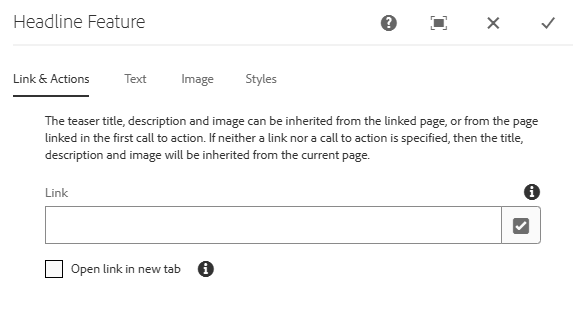
Headline Feature Configure Dialog: Link & Actions

Link: Authors can insert a link to the featured page by inputing the page URL directly or by selecting the checkmark icon to open the selection dialog and browsing for the page.

Open link in new tab: If checked, the linked page will open in a new tab.

Text
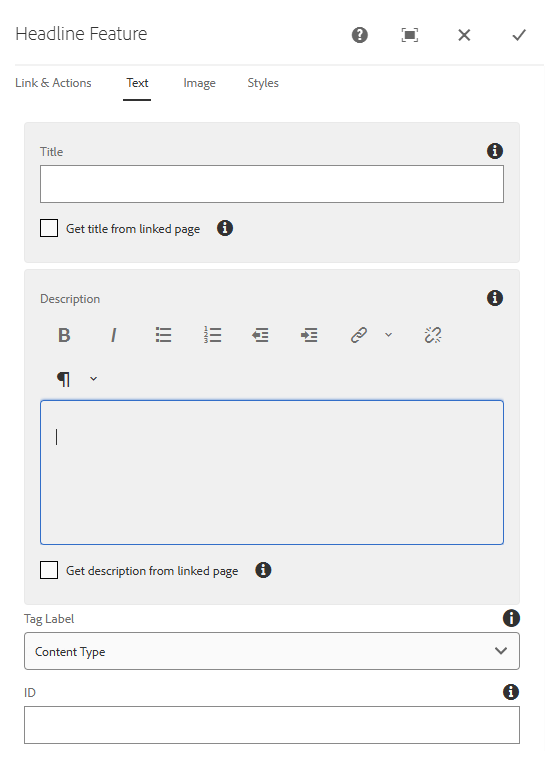
Headline Feature Configure Dialog: Text

Title: Check the 'Get title from linked page' checkbox below the field to pull the title from the page linked under the Link & Actions tab (link must point to page in AEM). Manually entering text will override the linked page title.

Description: Check the 'Get description from linked page' checkbox below the field to pull the teaser text from the page linked under the Link & Actions tab (link must point to page in AEM). Manually entering text will override the linked page teaser text.

Tag Label: Change which tag label shows in the component. This label can only be seen on the Single Featured Page and Homepage (ONLY) Feature styles.

  • Available options:
    • Content Type
    • Topics
    • Programs

ID: Apply an HTML ID attribute to the component to be used as an anchor link.

Image
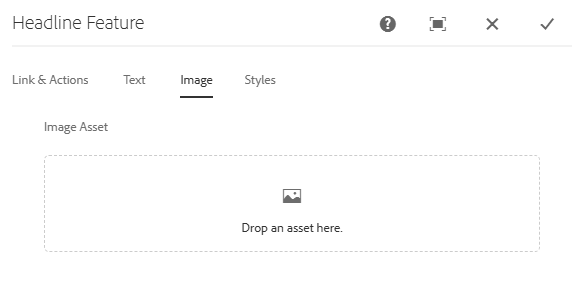
Headline Feature Configure Dialog: Image

Image Asset: Insert an image by dragging and dropping the asset from the Side Panel. The image must already be uploaded to the DAM.

Styles

There are three available styles for the Headline Feature component:

  1. Single Featured Page: Used to feature a single page and can show the tag label, unlike the other styles. Works best on the Census Detail 2 Column Left Template or Census Promotional Page. It can be used on the Census Detail 3 Column Template, but longer titles and text may be cut off.
  2. AC Featured Page: Primarily used on the Census Article 2 Column Right Template for America Counts stories. This style spans the full width of the page, so it should only be used for those cases or on promotional pages where the templates span the full width of the page.
  3. Homepage (ONLY) Feature: Only to be used on the Census Homepage.
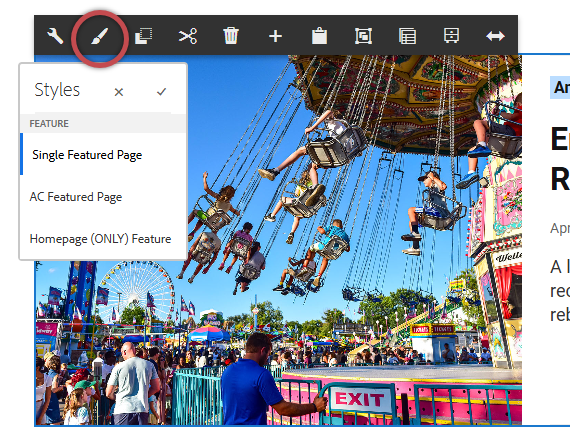
Headline Feature Styles

Single Featured Page

AC Featured Page

Homepage (ONLY) Feature

Developer Resources

Expand the section below to see the Headline Feature component's HTML output.

<div class="uscb-headline-feature cmp-feature">

    <div class="cmp-feature__content">

    <!-- Default view -->

<div class="uscb-headline-feature-default uscb-text-decoration-none uscb-grid-width-full" style="background-color: #bdf;">

<div class="uscb-featured-list-link uscb-layout-row uscb-grid-12 uscb-grid-tbl-12 uscb-grid-mbl-4 uscb-margin-LR-auto" onclick="linkClick(this, 'Teaser Extended Core Component');">

<div class="uscb-feature-banner-text uscb-headline-feature-title-wrapper uscb-grid-5 uscb-grid-tbl-12 uscb-grid-mbl-4">

<div class="uscb-headline-feature-title-padding uscb-grid-4 uscb-grid-tbl-12 uscb-grid-mbl-4">

<h1 class="uscb-h2 uscb-feature-banner-title uscb-bold-text">Tracking Supply Disruptions, Impact of Inflation on Small Business</h1>

<div class="uscb-sub-heading-1 uscb-feature-banner-description"></div>

</div>

</div>


                  <!-- Desktop image - allows expansion into right margin as needed -->

<div class="uscb-featured-list-image-container uscb-grid-7 uscb-grid-tbl-12 uscb-hide-lg">

                    <img class="uscb-featured-list-image" src="/content/dam/Census/library/stories/2023/10/inflation-impact-small-business/inflation-impact-small-business.jpg" style="height: 434px; max-width: calc(100% + (100vw - 1176px) / 2);">

                </div>


                  <!-- Tablet/mobile image - fully constrained -->

                <div class="uscb-featured-list-background uscb-grid-tbl-12 uscb-grid-mbl-4 uscb-grid-width-full-tbl uscb-grid-width-full-mbl uscb-hide-gt-lg" style="background-image: url(/content/dam/Census/library/stories/2023/10/inflation-impact-small-business/inflation-impact-small-business.jpg)"></div>

</div>

        </div>

        <!-- Single Display view -->

<div class="uscb-headline-feature-single-display uscb-text-decoration-none">

<div class="uscb-featured-list-link uscb-layout-row" onclick="linkClick(this, 'Teaser Extended Core Component');">

<div class="uscb-featured-list-background" style="background-image: url('/content/dam/Census/library/stories/2023/10/inflation-impact-small-business/inflation-impact-small-business.jpg');"></div>

<div class="uscb-feature-banner-text uscb-headline-feature-title-wrapper">

<div class="uscb-headline-feature-title-padding">

<h2 class="uscb-h2 uscb-feature-banner-title uscb-bold-text">Tracking Supply Disruptions, Impact of Inflation on Small Business</h2>

<div class="uscb-sub-heading-1 uscb-feature-banner-description"></div>

</div>

</div>

</div>

        </div>


    </div>

</div>

Top of Section