FAQ Search Form
The FAQ Search Form component allows users to search frequently asked questions and directs them to a configured FAQ Search Results page. The component can also display optional Helpful Links below the search bar.
On This Page:
Purpose
The FAQ Search Form component is used to help users search Help Center frequently asked questions. A user can enter a search term and either press Enter or select the Search button. The search term is sent to the configured FAQ Search Results page.
The component may be used with or without Helpful Links. Helpful Links can be added below the search bar to provide quick access to related FAQ content, common searches, or other helpful pages.
Configure Dialog
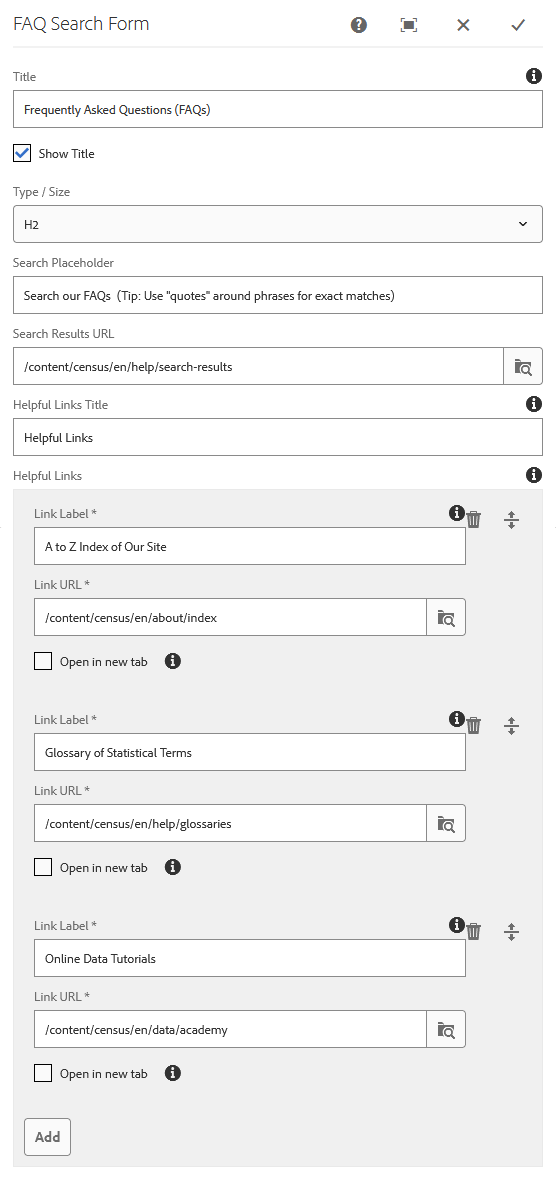
Title: Adds an optional heading above the FAQ Search Form.
Show Title: Displays the authored title above the search form. If this option is not selected, the title does not display on the page.
Type / Size: Changes the heading level for the title.
Available options:
- H2
- H3
- H4
- H5
Search Placeholder: Adds placeholder text inside the search input field. The placeholder text displays until the user clicks into the search field.
- Example: Search all FAQs
Search Results URL: Defines the FAQ Search Results page where users are sent after submitting a search.
- Authors should use the AEM content path.
- Example: /content/census/en/help/search-results
Helpful Links Title: Adds an optional heading above the Helpful Links area.
Helpful Links: Allows the author to add optional links below the search bar.
Each Helpful Link includes:
- Link Label: Text displayed for the Helpful Link. This field is required.
- Link URL: The page or URL the Helpful Link points to. This field is required.
- Open in new tab: Opens the link in a new browser tab.
All links outside of census.gov should open in a new tab.
Examples
FAQ Search Form with Helpful Links
Use this variation when the page needs to provide users with quick access to related FAQ topics, common searches, or other helpful Help Center pages.
Helpful Links display below the search bar within the component area.

FAQ Search Form without Helpful Links
Use this variation when the page only needs the FAQ search bar and does not need additional quick links below the search field.

