How can I match the GEOID from data.census.gov with the GEOID from the TIGER/Line Shapefiles?
When Using TIGER/Line Shapefile Vintages 2023 or Newer
Look for the fully qualified GEOID field called GEOIDFQ in the TIGER/Line Shapefiles and match it with the GEOID from the data.census.gov downloads. These fields will be an exact match, making it seamless to join the files together.
When Using TIGER/Line Shapefiles Vintages 2022 or Older
Fully qualified GEOIDs were not released in these historical vintages of the TIGER/Line Shapefiles. This means that in comparison to GEOIDs from the TIGER/Line Shapefiles, the GEOIDs in data.census.gov downloads have nine extra characters in the beginning that identify the:
- 3-digit summary level
- 2-digit geographic variant
- 2-digit geographic component
- “US”
The good news is that you can match up the GEOIDs between these two files by using an easy formula in Excel that will create a new column to remove the first nine characters. This will allow you to connect the data from your data.census.gov download with the TIGER/Line Shapefiles so you can map it.
To remove the first nine characters from data.census.gov GEOIDs:
- Open the data.census.gov .csv download in Microsoft Excel for the file name ending in "Data.csv.” Please check out the flyer on How to Download Tables as a CSV File if you need help getting to this step.
- Find the column labeled “GEO_ID.” It will often appear in column A. If GEO_ID is placed in a different column, copy and insert it in column A.
- Right click column B and click “Insert”
- Using the MID function, we can populate this new column with the only the portion of the GEO_ID after “US”
- Click into cell B3
- Type the formula =MID(A3,10,LEN(A3)) and press enter. This formula tells Excel to look at the GEO_ID in cell A3 and keep the values from the 10th character forward
- Apply the formula in cell B3 to the entire column with these steps:
- Click into cell B3
- In the lower right, you will see a green square. Double click it to apply this formula across all the GEOIDs. Your results should look similar to example below
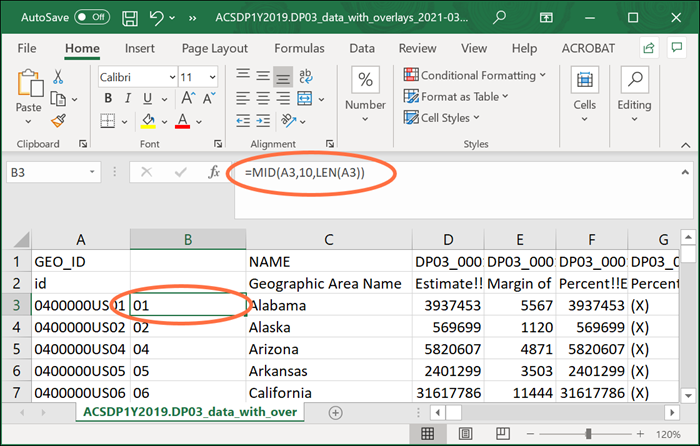
After completing these steps, you will be able to connect the GEOID from the TIGER/Line Shapefiles with the new GEOID you created in column B.
Contact Us
Email us at [email protected] for any questions or comments you may have. For more guidance on data availability and using data.census.gov, the Census API, and Microdata Access, visit our Resources page.