How do I select geographic components such as urban/rural?
Here are quick links to some common geographic components at the state level:
- All states – Rural
- All states – Urban
- All states – In Metropolitan Statistical Area
- All states – Not in Metropolitan Statistical Area
- All states – In Metropolitan or Micropolitan Statistical Area
- All states – Not In Metropolitan or Micropolitan Statistical Area
To select geographic components for a single geography, follow these steps. In this example, we will walk through how to select urban/rural for Hawaii:
- Open the filter panel
- Under the Geography heading, select State
- Click the tab to Show Geographic Components. Scroll to the list to see data from a wide variety of geographic components.
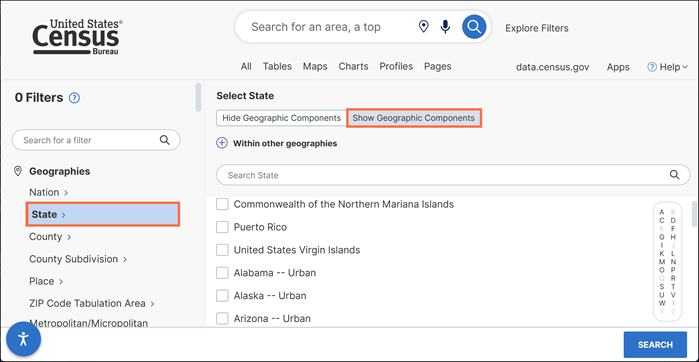
- Rather than scrolling through the long list, you may find it easier to use the option to search within the geography panel.
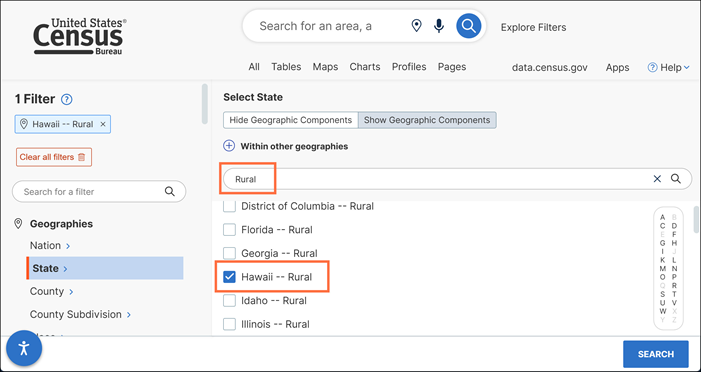
- Keyword for a geographic component
Type Rural in the search bar at the top of the panel and mark the check box for Hawaii -- Rural
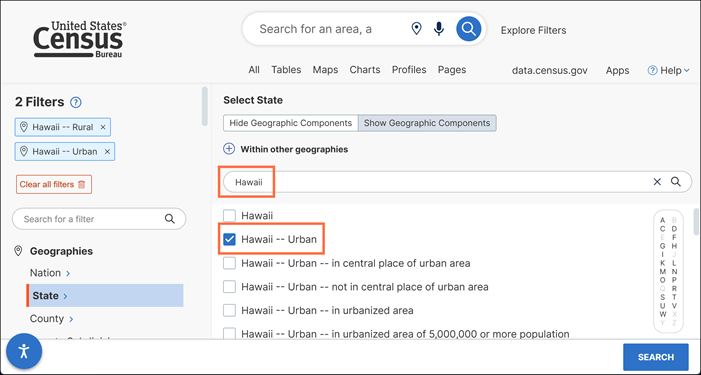
- Keyword for a specific geography
Type Hawaii in the search bar at the top of the panel and mark the check box for Hawaii – Urban
- Keyword for a geographic component
- From here you can add your filter for a topic or enter a table ID and continue with your search.
Contact Us
Email us at [email protected] for any questions or comments you may have. For more guidance on data availability and using data.census.gov, the Census API, and Microdata Access, visit our Resources page.